Thursday, July 20,2017
I have a laptop that was windows 8.1 an older version. Which kept getting viruses out of nowhere and that was a major problem I always had to be caution when I am used the laptop. So I was going to download Linux open source operating system. My coworker, Chase was helping me do the process because he did it before on his chrome laptop.
 The first thing we had to do disable secure boot. When disable the boot it would allow anyone to install from a Flash drive and be able to download in the computer that you would be using. It was hard at first.
How to Disable Secure boot:
The First step:
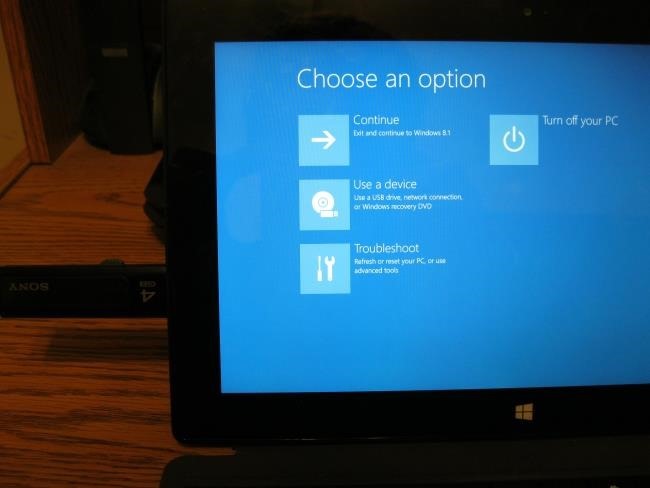
We hold in the shift key and then press the power button. For the computer to restart to the advanced boot options screen.
The Second step:
Select the Troubleshoot option, select Advanced options, and then select UEFI Settings.

Step 3: you will now be able to disable secure
Then when you got to download as software all Ubuntu in to the flash drive. So you could download it online.
Then we need to from reboot removing media. In doings you would need to
hold Shift while you click the Restart option. Insert your boot device of choice, select Use a device, and select the device you want to boot from.
In the wake of booting from the removable gadget, you can introduce Linux as you ordinarily would or simply utilize the live condition from the removable gadget without introducing it. Remember that Protected Boot is a helpful security include. You should abandon it empowered unless you have to run working frameworks that won't boot with Secure Boot empowered.
When it finished installing we then added partitions swap and root towards the end of the process when it was done. In the ended we add user name and password. For more information in what my coworker did you can look at his blog post: http://chaseinternship.blogspot.com/. When you are done you should updated once an month but it optional but I highly recommended it.
I have a laptop that was windows 8.1 an older version. Which kept getting viruses out of nowhere and that was a major problem I always had to be caution when I am used the laptop. So I was going to download Linux open source operating system. My coworker, Chase was helping me do the process because he did it before on his chrome laptop.
How to Disable Secure boot:
The First step:
We hold in the shift key and then press the power button. For the computer to restart to the advanced boot options screen.
The Second step:
Select the Troubleshoot option, select Advanced options, and then select UEFI Settings.
Step 3: you will now be able to disable secure
Then when you got to download as software all Ubuntu in to the flash drive. So you could download it online.
Then we need to from reboot removing media. In doings you would need to
hold Shift while you click the Restart option. Insert your boot device of choice, select Use a device, and select the device you want to boot from.
In the wake of booting from the removable gadget, you can introduce Linux as you ordinarily would or simply utilize the live condition from the removable gadget without introducing it. Remember that Protected Boot is a helpful security include. You should abandon it empowered unless you have to run working frameworks that won't boot with Secure Boot empowered.
When it finished installing we then added partitions swap and root towards the end of the process when it was done. In the ended we add user name and password. For more information in what my coworker did you can look at his blog post: http://chaseinternship.blogspot.com/. When you are done you should updated once an month but it optional but I highly recommended it.
Comments
Post a Comment